How to stop your AI coding agent from reading your .env file
An AI coding agent can open any file in your project. That includes your .env, where your API keys, database URLs and service-role tokens live. Here's a small Claude Code hook that says no before the file is ever opened.
01Why one read is enough
The agent doesn't have to be doing anything wrong for this to happen. Ask it "why can't the app connect to the database?" and opening .env to check DATABASE_URL is a perfectly reasonable next step. It's trying to help.
The problem is what happens after. Once the agent reads that file, those values are in its context window: the running conversation the model sees on every turn. From there they can end up in places you never intended.
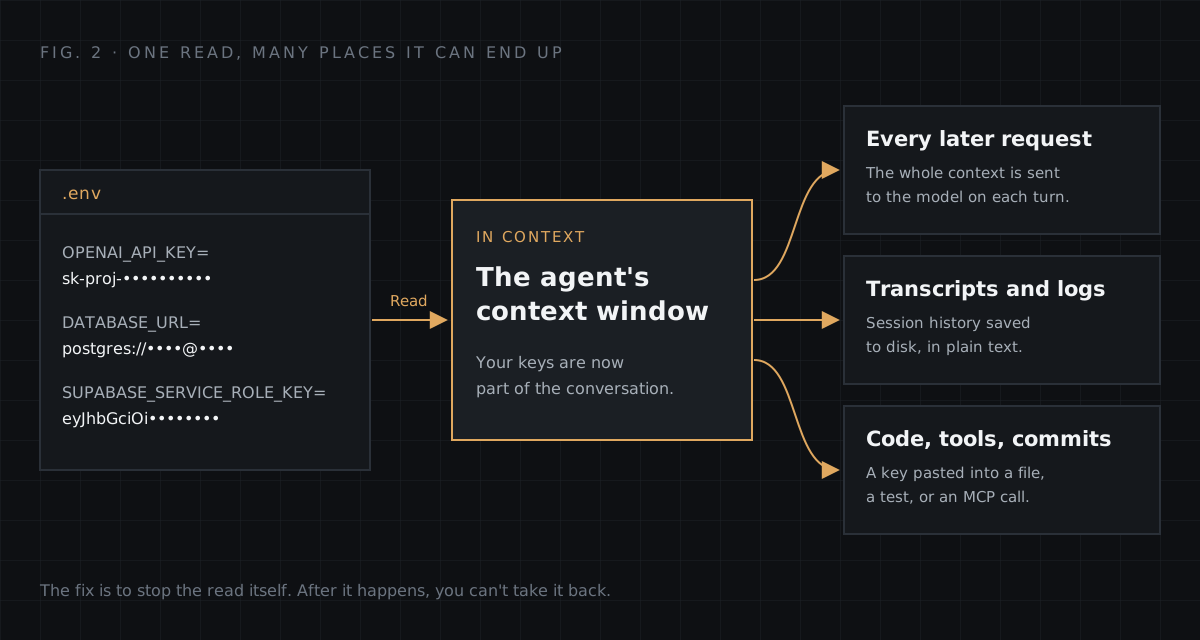
- Every later request. The context is sent to the model again on each turn, so the key rides along for the rest of the session.
- Transcripts and logs. Session history is saved to disk in plain text, outside the protections you put on
.envitself. - Code, tools and commits. The agent might "helpfully" inline a key into a config file, a test fixture, or an argument to another tool.
So the only reliable fix is to stop the read itself. You can do that with a Claude Code hook: a small script that runs before the agent uses a tool, and can say no. The whole setup takes about five minutes.
02What a hook is
Claude Code lets you register shell commands that run at specific points in its lifecycle: when you submit a prompt, before a tool runs, after a tool runs, when Claude finishes, and so on. The one we want is PreToolUse. It fires after the agent decides to call a tool (read a file, edit a file, run a shell command) and before that tool actually runs.
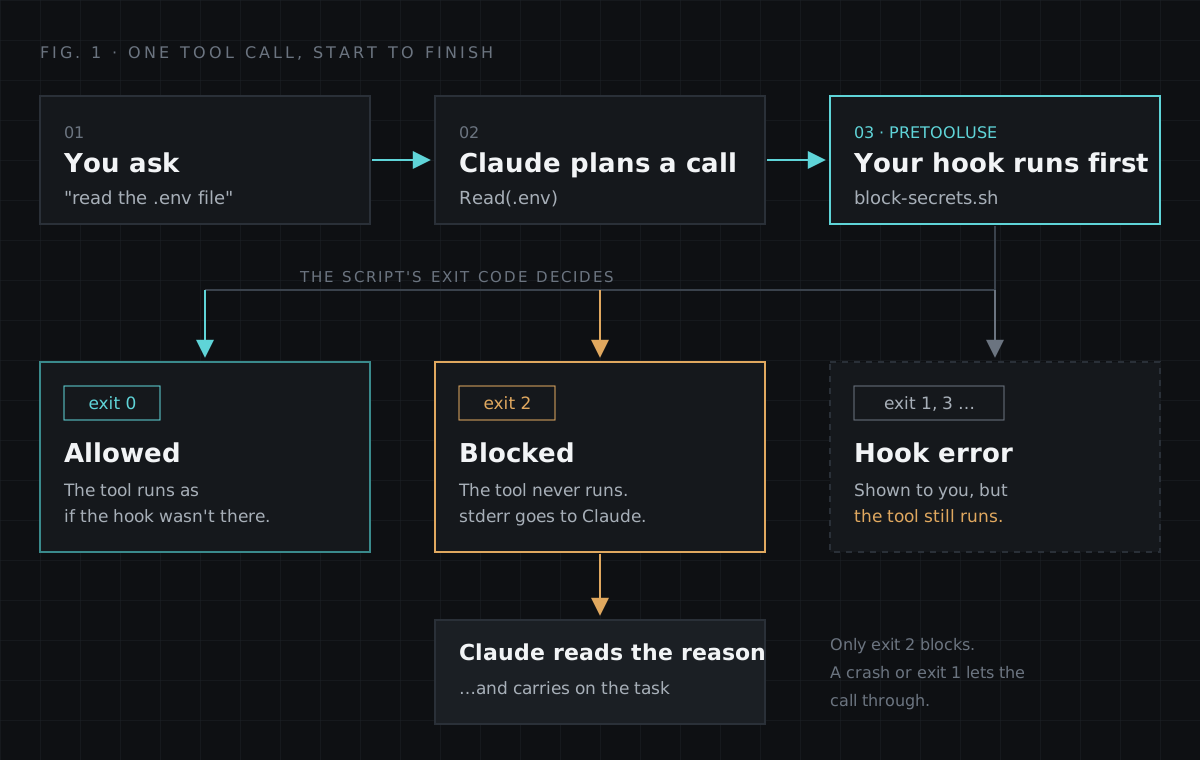
Your script receives a JSON description of the pending tool call on standard input. It then answers with its exit code:
| Exit code | What happens to the tool call | Where stderr goes |
|---|---|---|
| 0 | Runs normally | Nowhere that matters |
| 2 | Blocked. The tool never runs. | Back to Claude, as the reason |
| Anything else | Still runs. It's treated as a hook error, not a "no". | Shown to you, not Claude |
Two details matter here. First, the agent isn't just stopped. It's told why, so it can pick another approach and carry on with the rest of the task. Second, only exit 2 blocks. If your script crashes or exits 1, the call goes through. Keep that in mind; it comes back in Step 4.
03Step 1: Register the hook
Add this to .claude/settings.json in your project:
{
  "hooks": {
    "PreToolUse": [
      {
        "matcher": "Read|Edit|Write|Grep|Bash",
        "hooks": [
          {
            "type": "command",
            "command": "\"$CLAUDE_PROJECT_DIR\"/.claude/hooks/block-secrets.sh"
          }
        ]
      }
    ]
  }
}
Here's what each part does:
matcheris a pattern over tool names.Read|Edit|Write|Grep|Bashcovers every built-in way to touch a file: reading it, changing it, searching inside it, or going around the file tools withcat .envin a shell.commandis what runs.$CLAUDE_PROJECT_DIRis set by Claude Code to your project root, so the hook still resolves when Claude hascd'd into a subfolder. The quotes keep it working if the path has spaces.
Where you put this decides who it protects:
| File | Applies to | Shared with the team? |
|---|---|---|
.claude/settings.json | This project | Yes, commit it |
.claude/settings.local.json | This project | No, kept out of git |
~/.claude/settings.json | Every project on your machine | No, just you |
For the user-wide version, keep the script in ~/.claude/hooks/ and point command at ~/.claude/hooks/block-secrets.sh instead, since there's no single project directory to resolve against.
04Step 2: Write the script
Before writing it, look at what it will receive. For a Read call, standard input looks like this:
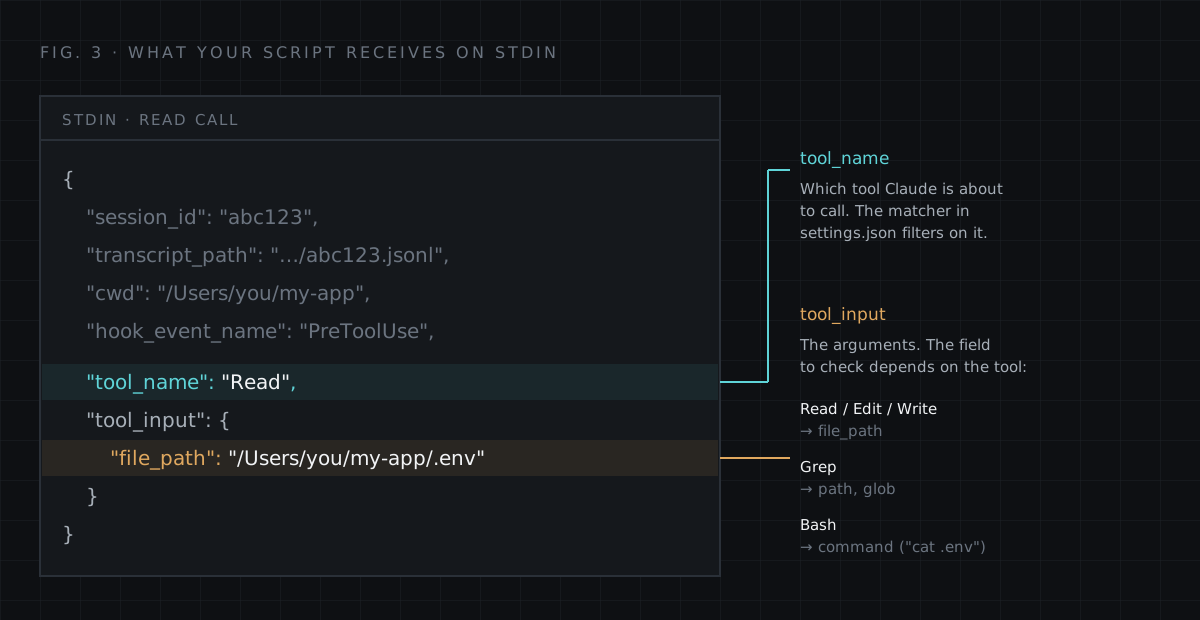
tool_name and tool_input. The field inside tool_input depends on the tool.Now create .claude/hooks/block-secrets.sh. Start with the simplest version that works:
#!/bin/bash
input=$(cat)
target=$(echo "$input" | jq -r '.tool_input.file_path // .tool_input.command // ""')

if echo "$target" | grep -E '(^|[ /])\.env' | grep -qv '\.example'; then
  echo "Blocked: .env files are off limits. Use .env.example for variable names." >&2
  exit 2
fi
exit 0
Make it executable, and install jq if you don't have it (it's the tool that parses the JSON):
chmod +x .claude/hooks/block-secrets.sh
brew install jq          # macOS
sudo apt install jq      # Debian / Ubuntu
What it does, line by line:
- Reads the whole tool-call JSON from stdin into
input. - Uses
jqto pull out the file path (for Read, Edit, Write) or, if there isn't one, the command (for Bash). The//means "or else", so it falls back to an empty string for anything else. - Checks whether that text contains
.envat the start, after a slash, or after a space. That catches.env,config/.envandcat .env, but notsrc/environments/, because there the dot is missing. - Lets
.env.examplethrough, because templates hold variable names, not values, and they're genuinely useful for the agent to read. - On a match, prints a reason to stderr and exits with code 2. That message is exactly what Claude will see, so write it as an instruction: say what to do instead.
05Step 3: Test it without Claude
You don't need Claude running to test a hook. It's just a script that reads stdin, so you can pipe in fake tool calls:
echo '{"tool_name":"Read","tool_input":{"file_path":".env"}}' | .claude/hooks/block-secrets.sh
echo "exit code: $?"
Expected: the "Blocked" message and exit code: 2.
I ran the simple version against the obvious cases, and then against a few less obvious ones:
| Tool | Input | Simple version |
|---|---|---|
| Read | .env | Blocked (exit 2) |
| Read | /app/.env.local | Blocked (exit 2) |
| Bash | cat .env | Blocked (exit 2) |
| Read | .env.example | Allowed (exit 0) |
| Read | src/app.ts | Allowed (exit 0) |
| Bash | cat ".env" | Allowed: gap |
| Bash | cat .env.example && cat .env | Allowed: gap |
| Grep | search inside .env | Allowed: gap |
| Any | .env, with jq not installed | Allowed: gap |
The first five rows are what most tutorials stop at. The last four are why it's worth running more than one test:
- Quotes. In
cat ".env"the character before.envis a quote, not a space or slash, so the pattern doesn't match. - A template in the same command. The
.examplecheck looks at the whole line. If.env.exampleappears anywhere, the entire command is waved through, including thecat .envafter it. - Grep. Its target lives in
tool_input.path, which the script never reads. - Missing
jq. The script errors,targetends up empty, nothing matches, and it exits 0. It fails open, silently.
06Step 4: Close the gaps
Here's the version I actually use. It's still about 20 lines:
#!/bin/bash
# Fail closed: without jq we can't inspect the call, so block it.
if ! command -v jq >/dev/null 2>&1; then
  echo "Blocked: jq is not installed, so the secrets hook can't inspect this call." >&2
  exit 2
fi

input=$(cat)
# Collect every field that can name a file: Read/Edit/Write, Grep, Bash.
target=$(printf '%s' "$input" | jq -r '[.tool_input.file_path, .tool_input.path, .tool_input.glob, .tool_input.command] | map(select(. != null)) | join(" ")')

# Remove the safe templates first, then look for any .env that is left.
rest=$(printf '%s' "$target" | sed -E 's/\.env\.(example|sample|template)//g')

if printf '%s' "$rest" | grep -qE '(^|[^A-Za-z0-9_])\.env'; then
  echo "Blocked: .env files are off limits. Use .env.example for variable names." >&2
  exit 2
fi
exit 0
What changed, and why:
- It fails closed. If
jqis missing, it blocks with a clear reason instead of silently allowing everything. Annoying for a minute, but far better than thinking you're protected when you're not. - It reads every field that can name a file.
file_path,pathandglobcover Read, Edit, Write and Grep;commandcovers Bash. Whatever is present gets joined into one string to check. - It removes templates before checking, instead of after.
.env.example,.env.sampleand.env.templateare deleted from the string first. A template can no longer vouch for the rest of the command. - It matches
.envafter any non-word character. Quotes,=,(, spaces and slashes all count. A letter before the dot doesn't, soprocess.envandimport.meta.envin code or commands are left alone.
Run both versions through the same cases and the gaps close:
| Tool | Input | Simple | Hardened |
|---|---|---|---|
| Bash | cat ".env" | Allowed | Blocked |
| Bash | cat .env.example && cat .env | Allowed | Blocked |
| Grep | path .env or glob .env* | Allowed | Blocked |
| Any | jq not installed | Allowed | Blocked, with reason |
| Edit | /proj/.env.production | Blocked | Blocked |
| Read | .env.example | Allowed | Allowed |
| Bash | node -e "console.log(process.env.HOME)" | Allowed | Allowed |
| Bash | npm run dev | Allowed | Allowed |
To make re-testing a habit, save the cases as a small script and run it whenever you change the hook:
for json in \
  '{"tool_name":"Read","tool_input":{"file_path":".env"}}' \
  '{"tool_name":"Bash","tool_input":{"command":"cat \".env\""}}' \
  '{"tool_name":"Bash","tool_input":{"command":"cat .env.example && cat .env"}}' \
  '{"tool_name":"Grep","tool_input":{"pattern":"KEY","path":".env"}}' \
  '{"tool_name":"Read","tool_input":{"file_path":".env.example"}}' \
  '{"tool_name":"Bash","tool_input":{"command":"npm run dev"}}'
do
  printf '%s' "$json" | .claude/hooks/block-secrets.sh 2>/dev/null
  echo "exit $?  $json"
done
You should see four exit 2 lines followed by two exit 0 lines.
07What it looks like in practice
If Claude Code is already open, start a new session so it picks up the hook (you can also review registered hooks with the /hooks command). Then ask it to "read the .env file".
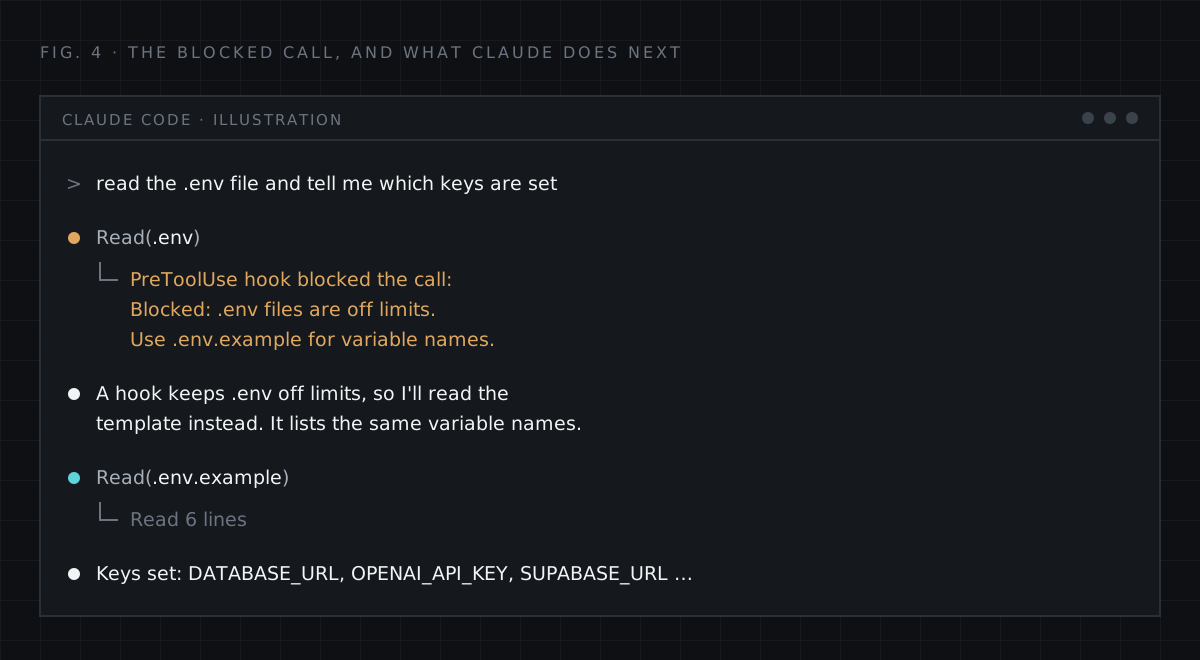
The call to Read(.env) never runs. Claude sees the hook's message, then moves on. In my case it offered to work from the example config instead, which is exactly what the message told it to do.
Two things that are easy to worry about, but don't need to:
- Your app still works. The hook only inspects the agent's tool calls. When Claude runs
npm run dev, your app loads.envitself through dotenv or your framework, and the command text never mentions the file. - Auto-approve doesn't skip it. The hook runs before the permission check, so it applies even to tools you've told Claude Code to run without asking.
Your secrets stay in the file, and out of the context window.
08Limits you should know about
This is a guardrail, not a sandbox. It catches the ordinary, well-meaning ways an agent opens a secret file. It can't stop something that's trying to get around it.
- It's a text pattern. The hook only sees the command string. A path built indirectly, like
cat ./.e*(a glob the shell expands later) or a filename assembled from variables, doesn't contain.env, so it passes. I confirmed the glob case gets through the hardened script too. - Programs can still read the file. If Claude runs a script that loads
.envand prints its values, the hook seesnode print-config.js, not the file. Be wary of debug scripts that dump the environment. - It only covers the tools in your matcher. If you add other tools that can read files, such as an MCP filesystem server, add their tool names to the matcher (MCP tools are named like
mcp__server__tool, and the matcher accepts patterns such asmcp__filesystem__.*). The hardened script already checkspath, which many of them use. - Other secret files exist.
.envis the common one. To extend the check to*.pemkeys,credentials.jsonand.npmrc, swap thegrepline for the one below (and make the message say "secret files").
if printf '%s' "$rest" | grep -qE '(^|[^A-Za-z0-9_])\.env|\.pem($|[^A-Za-z0-9_])|credentials\.json|\.npmrc'; then09Add a second and third layer
No single control covers everything, so stack a few that fail in different ways:
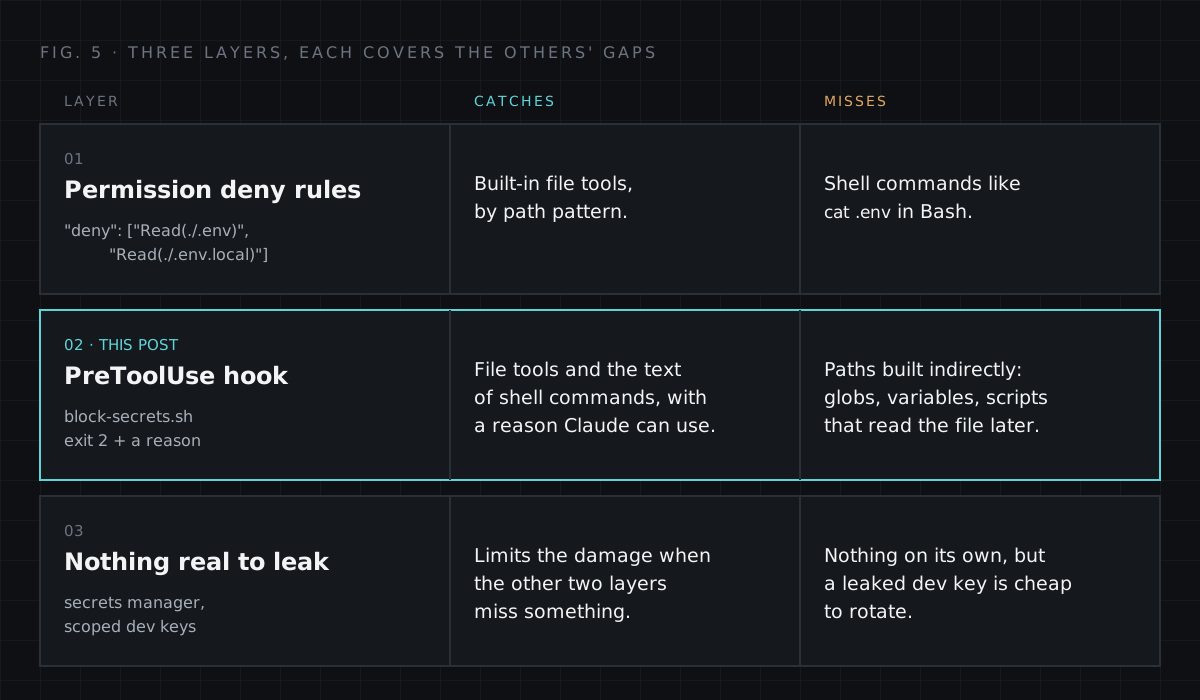
Layer 1: permission deny rules. Claude Code's own settings can refuse to read specific paths, with no script involved. Add them next to the hooks block:
{
  "permissions": {
    "deny": [
      "Read(./.env)",
      "Read(./.env.local)",
      "Read(./.env.production)"
    ]
  }
}
List your real files by name rather than using a wildcard like .env.*, which would also deny .env.example. Deny rules match on paths, so they don't see cat .env inside a shell command. That's the gap the hook fills.
Layer 2: the hook from this post, which also covers Bash and tells Claude what to do instead.
Layer 3: nothing valuable to leak. Keep real production secrets out of local files whenever you can. Use a secrets manager, and short-lived or tightly scoped keys for development. If something does slip through, rotating a scoped dev key is a five-minute job, not an incident.
10Troubleshooting
- The hook never fires. Check the script is executable (
chmod +x), the path incommandis right, andsettings.jsonis valid JSON (jq . .claude/settings.jsonwill complain if it isn't). Then start a new session. Runningclaude --debugshows hook activity as it happens. - Every call is blocked with "jq is not installed". That's the fail-closed check working. Install
jqand it clears up. - A file you need is blocked. The pattern also matches names that start with
.env, like.envrc. Add the file to thesedline alongsideexample|sample|templateif it's safe to read, or leave it blocked if it holds secrets too (an.envrcoften does).
11Quick checklist
0 / 6 done
12Wrapping up
AI coding agents are most useful when you let them move fast, and hooks let you set the boundaries once instead of watching every step. A 20-line script is a small price for keeping your keys out of the context window. Just remember to test it like an attacker would, not only like a user would. That's where the interesting bugs were.
I share practical dev tips like this regularly. You can follow along on Instagram at @mubashi_mohd.builds or find more at ordinarydev.in.